Today we’re going to explore pulling useful information out of an Ansible Playbook run. Once again, I’ll be using two virtual Cisco CSR routers for the testing. In this part we will look at applying configuration to Cisco devices using Ansible. We will only look at applying static configuration in this part. Variables will be introduced in another post.
Unfortunately, when it comes to networking, the Ansible modules are not as full-featured or idempotent as other modules are and may require some trickery in order to get them to behave just the way we would like. We will look at using a native module and show the downsides to using it then we will look at another method to do the same thing using the configuration module.
For this example we will look at configuring NTP via Ansible. Here is the documentation I will be referencing.
We start by creating a playbook. We’ll name it configure-ntp.yaml
vi configure-ntp.yaml
...
---
- name: Configure NTP for IOS Devices
  hosts: all
  gather_facts: false

  tasks:
    - cisco.ios.ios_ntp:
        server: 129.6.15.28
If we run this playbook with ansible-playbook configure-ntp.yaml -i hosts we see output like the following. We can see that the configuration on the two routers has been change.

If we run the same command again, we see output like the following indicating that nothing has changed because we our routers are already configured for these NTP servers.

Log into the router and examine the configuration. We can see that our desire configuration has been applied. Pretty cool!

Pretty cool until you want to do something a little more complex, that is. Say you have an existing configuration that you want to overwrite, and multiple NTP servers you want to add to the configuration.
Multiple NTP servers is easy! Just add another task to the playbook!
vi configure-ntp.yaml
...
---
- name: Configure NTP for IOS Devices
  hosts: all
  gather_facts: false

  tasks:
    - cisco.ios.ios_ntp:
        server: 129.6.15.28
    - cisco.ios.ios_ntp:
        server: 10.123.123.123
And run the playbook again. Nice!

But what if you have existing and inconsistent configuration that you want to replace on all of your devices. Some devices have 192.168.123.123, some devices have 172.31.123.123, some devices have both, some devices have no NTP configuration. What are your options?
We can start with the state: absent argument in our task, then our playbooks look like the following. We specify all the NTP servers we want configured and the NTP servers we do not want configured. The problem with this is that it requires us to know ALL of the NTP servers we do not wish to have. Easy enough across two devices but hard across 100s of devices with inconsistent configuration.
vi configure-ntp.yaml
...
---
- name: Configure NTP for IOS Devices
  hosts: all
  gather_facts: false

  tasks:
    - cisco.ios.ios_ntp:
        server: 129.6.15.28
    - cisco.ios.ios_ntp:
        server: 10.123.123.123
    - cisco.ios.ios_ntp:
        server: 192.168.123.123
        state: absent
    - cisco.ios.ios_ntp:
        server: 172.31.123.123
        state: absent
When talking with colleagues I often refer to Ansible as being quick and dirty… you can run head-first, right into a brick wall. It’s very easy to get started but very time consuming to sort out and understand all the nuances of each module… especially when it comes to network devices.
Now we will look at another way to do this using the ios_config module and a little CLI scrapping. The ios_config module allows us to apply any configuration to an IOS device. We will focus on using it to configure NTP. We will also introduce a few other modules such as ios_facts and ios_command to build a playbook that will suite our needs.
Create a new playbook. enforce-ntp.yaml We name this module enforce NTP as it will read the current configuration, erase what is not desired and configure what is desired.
vi enforce-ntp.yaml
...
---
# There is an NTP module for Cisco IOS but it does not contain
# the logic needed for VRFs or removing unwanted servers.

- name: Configure NTP for IOS Devices
  hosts: all
  gather_facts: false

  vars:
    ntp_config:
      - ntp server 10.123.123.123
      - ntp server 129.6.15.28

  tasks:
    - name: Gather IOS Facts
      cisco.ios.ios_facts:

    - name: Gather Current NTP Configuration
      when: ansible_network_os == 'cisco.ios.ios'
      cisco.ios.ios_command:
        commands:
          - "show running-config full | include ntp server"
      register: get_config

    - name: Remove Other NTP Servers
      when: "(get_config.stdout_lines[0] != '') and (item not in ntp_config) and ansible_net_iostype == 'IOS-XE'"
      with_items: "{{ get_config.stdout_lines[0] }}"
      cisco.ios.ios_config:
        lines:
          - "no {{ item }}"

    - name: Configure IOS NTP Servers
      when: ansible_network_os == 'cisco.ios.ios'
      with_items: "{{ ntp_config }}"
      cisco.ios.ios_config:
        lines:
          - "{{ item  }}"
This playbook introduces quite a few things pretty quickly so I will try to break it down as much as possible.
  vars:
    ntp_config:
      - ntp server 10.123.123.123
      - ntp server 129.6.15.28
Vars is a section in the playbook where variables are defined. In this case we have a variable ntp_config. That variable is a YAML list with two elements inside of it. In this case it is the NTP configuration we wish to apply to our routers.
- name: Gather IOS Facts
  cisco.ios.ios_facts:
The ios_facts module connects to the device and captures information about the device. Ansible stores that information as facts which can be referenced later and used as variables or for logic decisions. We did not specify any arguements so by default we collect all facts. Arguments can be added to capture a specific subset of facts and speed up playbook execution time if desired. Information such as IOS Type (IOS vs IOS-XE), serial number, model, hostname, interfaces and much more are included in facts.
- name: Gather Current NTP Configuration
  when: ansible_network_os == 'cisco.ios.ios'
  cisco.ios.ios_command:
    commands:
      - "show running-config full | include ntp server"
  register: get_config
This task makes use of the ios_command module to connect to the router and capture the relevant configuration lines but ONLY WHEN the ansible_network_os is equal to ‘cisco.ios.ios’ This particular bit of information comes from the inventory file. It then saves the configuration to a variable named get_config
Under the hood, this variable is a JSON dictionary with 4 keys. changed, failed, stdout, stdout_lines. changed and failed are boolian values to show if this task is changing anything or failed in anyway. stdout and stdout_lines contain the same information but formatted in a different way. Both of these are the result of the command we ran show running-config full | include ntp server
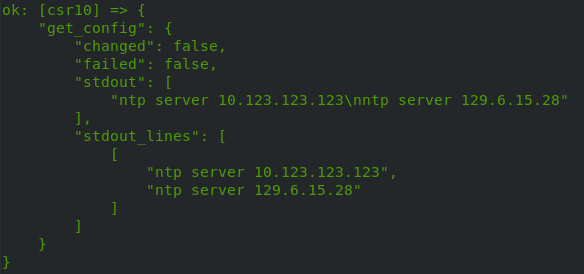
- name: Remove Other NTP Servers
  when: "(get_config.stdout_lines[0] != '') and (item not in ntp_config) and ansible_net_iostype == 'IOS-XE'"
  with_items: "{{ get_config.stdout_lines[0] }}"
  cisco.ios.ios_config:
    lines:
      - "no {{ item }}"
This task uses the variable from the last task to determine which configuration needs to be removed from the device.
In English this task appends no to the configuration line WHEN stdout_lines is NOT an empty string and when the line does not equal one of the lines from our variable ntp_config BUT it will only do this when the ansible_net_iostype is equal to IOS-XE which was captured in the IOS Facts task. This fact check isn’t NEEDED but it’s good to know its something we can do as it will come in handy as we get into more complex topics.
After we have removed the NTP servers we do not wish to have set on the device, we set the ones we specified in our vars section earlier.
- name: Configure IOS NTP Servers
  when: ansible_network_os == 'cisco.ios.ios'
  with_items: "{{ ntp_config }}"
  cisco.ios.ios_config:
    lines:
      - "{{ item  }}"
This task introduces with_items. This is a looping mechanism in Ansible and is used to run the module one time for each item in the loop. It is essentially a for loop.
This task in English performs the following -> When the network operating system is Cisco IOS, use the Cisco IOS config module to add each line from our variable ntp_config
We have now specified the exact configuration we wish to see on the device, captured some information about the device, captured the current configuration from the device, used facts to determine if we should deleted undesired configuration, and then applied the desired configuration to the device.
 Work, and stuff
nice piece of code for ntp update, thanks
LikeLike