I spent countless hours trying to perform some interoperability testing and PoC VLAN-Aware bundles between these two vendors. Arista’s EVPN-MPLS documentation is very hard to find and overall lacking. Juniper has a lot of documentation and a lot of examples. The problem is that some of the documentation and examples conflict. In this specific example I am using vMX version 18.2R1.9 and vEOS 4.28.1F. Hopefully Google index’s this pretty quickly so you don’t end up like me with all purple search results.
Here are some links to some other useful resources.
Juniper EVPN Overview and Examples
Juniper Control Word
Juniper Flexible Ethernet Services
Juniper Flexible Ethernet Services EVPN VXLAN
Arista MPLS / LDP
- Build the physical topology.
- Build the underlay
- Configure CE facing interfaces
- Configure CE Interfaces
- Deploy BGP
- Layer in MPLS
- Build the VLAN-Aware Bundles (MAC-VRF)
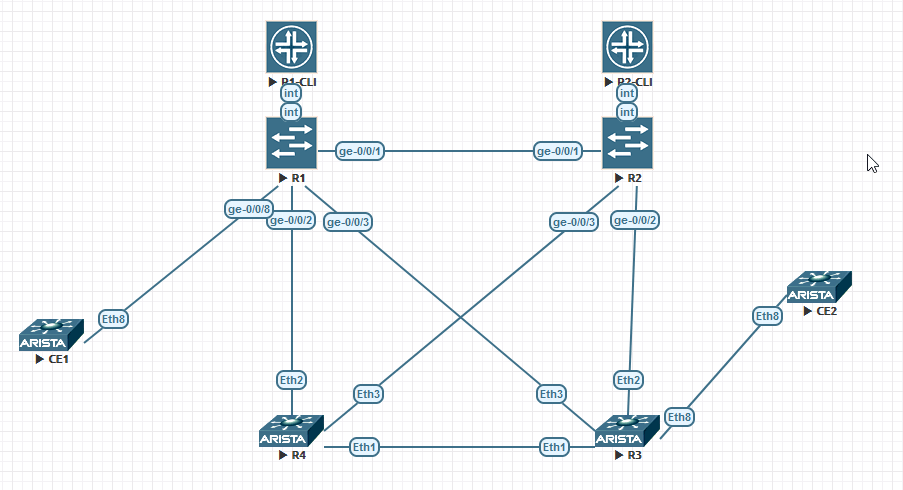
Build the physical topology.
Mine looks like this
Build the underlay
R1
root@R1# show routing-options
router-id 10.255.255.1;
autonomous-system 123;
forwarding-table {
    chained-composite-next-hop {
        ingress {
            evpn;
        }
    }
}

root@R1# show chassis
network-services enhanced-ip;

root@R1# show interfaces
ge-0/0/1 {
    description "TO R2";
    unit 0 {
        family inet {
            address 10.0.1.2/24;
        }
    }
}
ge-0/0/2 {
    description "TO R4";
    unit 0 {
        family inet {
            address 10.0.2.2/24;
        }
        family mpls;
    }
}
ge-0/0/3 {
    description "TO R3";
    unit 0 {
        family inet {
            address 10.0.40.1/24;
        }
    }
}
lo0
unit 0 {
    family inet {
        address 10.255.255.1/32;
    }
}

root@R1# show protocols ospf
reference-bandwidth 400g;
area 0.0.0.0 {
    interface ge-0/0/1.0 {
        interface-type p2p;
    }
    interface ge-0/0/2.0 {
        interface-type p2p;
    }
    interface ge-0/0/3.0 {
        interface-type p2p;
    }
    interface lo0.0;
}
R2
root@R2# show routing-options
router-id 10.255.255.2;
autonomous-system 123;
forwarding-table {
    chained-composite-next-hop {
        ingress {
            evpn;
        }
    }
}

root@R2# show chassis
network-services enhanced-ip;

root@R2# show interfaces
ge-0/0/1 {
    description "TO R1";
    unit 0 {
        family inet {
            address 10.0.1.1/24;
        }
    }
}
ge-0/0/2 {
    description "TO R3";
    unit 0 {
        family inet {
            address 10.0.20.1/24;
        }
        family mpls;
    }
}
ge-0/0/3 {
    description "TO R4";
    unit 0 {
        family inet {
            address 10.0.30.1/24;
        }
    }
}
lo0 {
    unit 0 {
        family inet {
            address 10.255.255.2/32;
        }
    }
}


root@R1# show protocols ospf
reference-bandwidth 400g;
area 0.0.0.0 {
    interface ge-0/0/1.0 {
        interface-type p2p;
    }
    interface ge-0/0/2.0 {
        interface-type p2p;
    }
    interface ge-0/0/3.0 {
        interface-type p2p;
    }
    interface lo0.0;
}
R3
ip routing
!
service routing protocols model multi-agent
!
interface Ethernet1
   no switchport
   ip address 10.0.11.1/24
   ip ospf network point-to-point
!
interface Ethernet2
   no switchport
   ip address 10.0.20.2/24
   ip ospf network point-to-point
!
interface Ethernet3
   no switchport
   ip address 10.0.40.2/24
   ip ospf network point-to-point
!
interface Loopback0
   ip address 10.255.255.3/32
!
router ospf 1
   auto-cost reference-bandwidth 400000
   network 0.0.0.0/0 area 0.0.0.0
   max-lsa 12000
R4
ip routing
!
service routing protocols model multi-agent
!
interface Ethernet1
   no switchport
   ip address 10.0.11.2/24
   ip ospf network point-to-point
!
interface Ethernet2
   no switchport
   ip address 10.0.2.1/24
   ip ospf network point-to-point
!
interface Ethernet3
   no switchport
   ip address 10.0.30.2/24
   ip ospf network point-to-point
!
interface Loopback0
   ip address 10.255.255.4/32

router ospf 1
   auto-cost reference-bandwidth 400000
   network 0.0.0.0/0 area 0.0.0.0
   max-lsa 12000
Configure CE facing interfaces
On the Juniper side of the house there are a lot of different ways to go about this. To me, this one is the easiest.
R1
root@R1# show interfaces ge-0/0/8
flexible-vlan-tagging;
mtu 9216;
encapsulation flexible-ethernet-services;
unit 10 {
    encapsulation vlan-bridge;
    vlan-id 10;
}
unit 11 {
    encapsulation vlan-bridge;
    vlan-id 11;
}
R3
R3(config)#show running-config interfaces ethernet 8
interface Ethernet8
   switchport trunk allowed vlan 10-11
   switchport mode trunk
Configure CE Interfaces
They are simply tagged sub-interfaces.
CE1
CE1#show running-config interfaces ethernet 8.10
interface Ethernet8.10
   encapsulation dot1q vlan 10
   ip address 100.100.10.1/24

CE1#show running-config interfaces ethernet 8.11
interface Ethernet8.11
   encapsulation dot1q vlan 11
   ip address 100.100.11.1/24
CE2
CE2#show running-config interfaces ethernet 8.10
interface Ethernet8.10
   encapsulation dot1q vlan 10
   ip address 100.100.10.2/24

CE2#show running-config interfaces ethernet 8.11
interface Ethernet8.11
   encapsulation dot1q vlan 11
   ip address 100.100.11.2/24
Deploy BGP
In this case I am using R1 as a route-reflector.
R1
root@R1# show protocols bgp
group INTERNAL {
    type internal;
    family inet {
        unicast;
    }
    family inet-vpn {
        unicast;
    }
    family evpn {
        signaling;
    }
    cluster 10.255.255.1;
    peer-as 123;
    neighbor 10.255.255.2;
    neighbor 10.255.255.3;
    neighbor 10.255.255.4;
}
R3
R3(config)#show running-config | section bgp
router bgp 123
   router-id 10.255.255.3
   neighbor INTERNAL peer group
   neighbor INTERNAL remote-as 123
   neighbor INTERNAL update-source Loopback0
   neighbor INTERNAL rib-in pre-policy retain all
   neighbor INTERNAL send-community standard extended
   neighbor 10.255.255.1 peer group INTERNAL
   !
   address-family evpn
      neighbor default encapsulation mpls next-hop-self source-interface Loopback0
      neighbor INTERNAL activate
   !
   address-family ipv4
      neighbor INTERNAL activate
Layer in MPLS
In this example I am using LDP to keep things simple. In another post we may look at other methods of distributing labels.
root@R1# show interfaces
ge-0/0/1 {
    description "TO R2";
    unit 0 {
        family inet {
            address 10.0.1.2/24;
        }
        family mpls;
    }
}
ge-0/0/2 {
    description "TO R4";
    unit 0 {
        family inet {
            address 10.0.2.2/24;
        }
        family mpls;
    }
}
ge-0/0/3 {
    description "TO R3";
    unit 0 {
        family inet {
            address 10.0.40.1/24;
        }
        family mpls;
    }
}

root@R1# show protocols mpls
interface ge-0/0/1.0;
interface ge-0/0/2.0;
interface ge-0/0/3.0;
interface lo0.0;


root@R1# show protocols ldp
interface ge-0/0/1.0;
interface ge-0/0/2.0;
interface ge-0/0/3.0;
interface lo0.0;
mpls ip
!
mpls ldp
   router-id 10.255.255.3
   transport-address interface Loopback0
   no shutdown
!
interface Ethernet1
   no switchport
   ip address 10.0.11.1/24
   mpls ldp interface
   ip ospf network point-to-point
!
interface Ethernet2
   no switchport
   ip address 10.0.20.2/24
   mpls ldp interface
   ip ospf network point-to-point
!
interface Ethernet3
   no switchport
   ip address 10.0.40.2/24
   mpls ldp interface
   ip ospf network point-to-point
!
interface Loopback0
   ip address 10.255.255.3/32
   mpls ldp interface
!
Build the VLAN-Aware Bundles (MAC-VRF)
I named my MAC-VRF ‘TEST123’ and kept things simple by keeping the import and export target communities the same.
Juniper MX
You will notice that ‘control-word’ is bolded here. IT IS VERY IMPORTANT. This is a shim that exist between the MPLS portion of the packet and the encapsulated Ethernet portion of the packet. Arista does this by default. Juniper does not. I will show you a packet capture of this before and after.
There are a few different ways you can configure this routing-instance. Note that the CE facing interface and the routing-instance configuration must be compatible with each other. I may show you another way to accomplish the same end-result.
R1
root@R1# show routing-instances
TEST123 {
    instance-type virtual-switch;
    route-distinguisher 0.0.0.123:123;
    vrf-target target:123:123;
    protocols {
        evpn {
            control-word;
            extended-vlan-list 10-11;
        }
    }
    bridge-domains {
        VLAN10 {
            domain-type bridge;
            vlan-id 10;
            interface ge-0/0/8.10;
        }
        VLAN11 {
            domain-type bridge;
            vlan-id 11;
            interface ge-0/0/8.11;
        }
    }
}
Arista
Nothing too special here.
R3
R3(config)#show running-config | in vlan
vlan 10,11

R3(config)#show running-config | section bgp
router bgp 123
...
   vlan-aware-bundle TEST123
      rd 0.0.0.123:123
      route-target both 123:123
      redistribute learned
      vlan 10-11
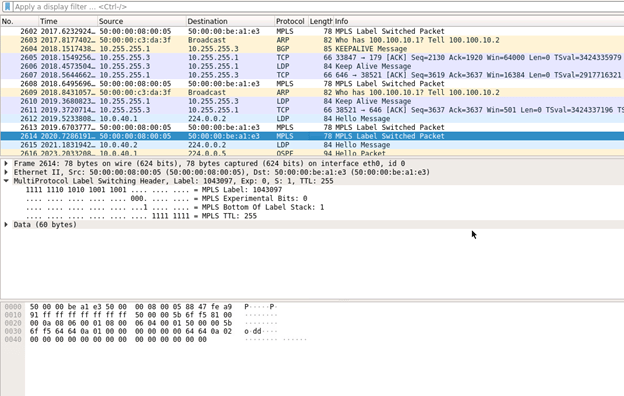
Here is a packet capture from on the link between R1 and R3 when a ping was sourced from PE1. You’ll notice Wireshark isn’t able to decipher any of the lower (actually higher? encapsulated?) layer protocol information. This is because the shim – Control Word – is not added to the header.
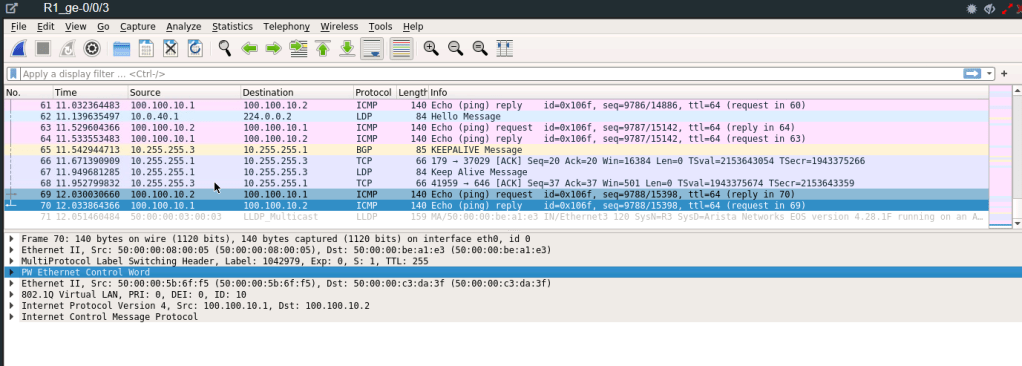
After adding Control Word the routing-instance (MAC-VRF) configuration.
 Work, and stuff
One thought on “Juniper MX – Arista: EVPN-MPLS VLAN-Aware Bundle”