In our last post we saw how we can use Terraform to enforce state inside of Cisco ACI. We did simple tasks like adding or ensuring which switches were added to the fabric. Now well look at Terraform and the ability it gives us to tie or link resources together. We will also look at how easy it is to change something or rename a policy using Terraform.
One of the first things a lot of engineers do when they first get their hands on ACI is create interface policies and interface policy groups as these are familiar constructs. Properties like LLDP, CDP, MCP, STP, and duplex need to be configured and then pulled together into a policy group that can be applied to interfaces.
We’ll focus on LLDP, CDP, and MCP (mis-cabling protocol) as these are some of the easier policies to configure as they do not have many options. To configure these policies we use the aci_lldp_interface_policy, aci_cdp_interface_policy, and aci_miscabling_protocol_interface_policy resources in the Cisco ACI provider. To enable LLDP – transmit and receive, CDP, and MCP in a policy add the following anywhere in your main.tf file. Save the file.
resource "aci_lldp_interface_policy" "LLDP_ENABLED_INT_POL" {
  name = "LLDP_ENABLED_INT_POL"
  description = "LLDP_ENABLED_INT_POL"
  admin_rx_st = "enabled"
  admin_tx_st = "enabled"
}

resource "aci_cdp_interface_policy" "CDP_ENABLED_INT_POL" {
  name = "CDP_ENABLED_INT_POL"
  description = "CDP_ENABLED_INT_POL"
  admin_st = "enabled"
}

resource "aci_miscabling_protocol_interface_policy" "MCP_ENABLED_INT_POL" {
  name = "MCP_ENABLED_INT_POL"
  description = "MCP_ENABLED_INT_POL"
  admin_st = "enabled"
}
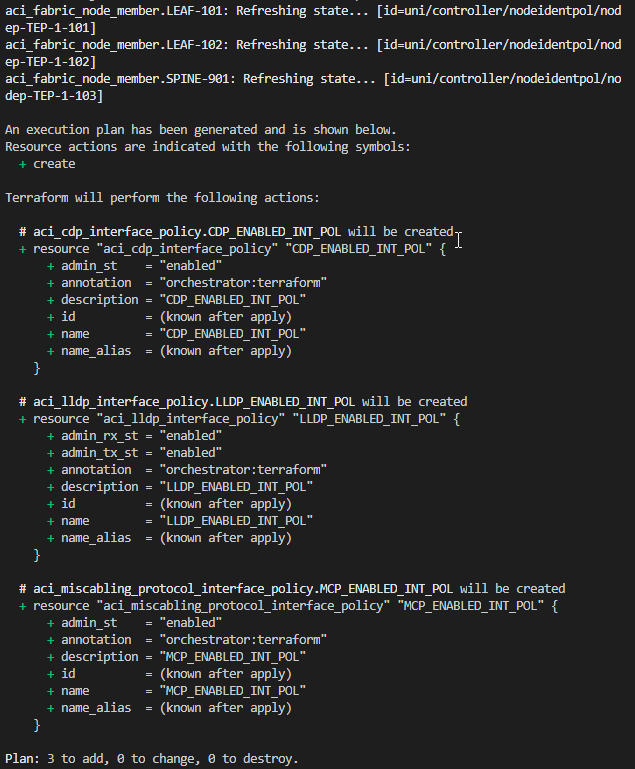
There is no need to delete the fabric_node_member resources we added earlier. Terraform is smart enough to see that these already exist in the fabric and will not try to add them again. We can see this by running terraform plan At the top we can see the resources that already exist and under that are all the changes that will be made. In this case, we are adding the 3 interface policies.
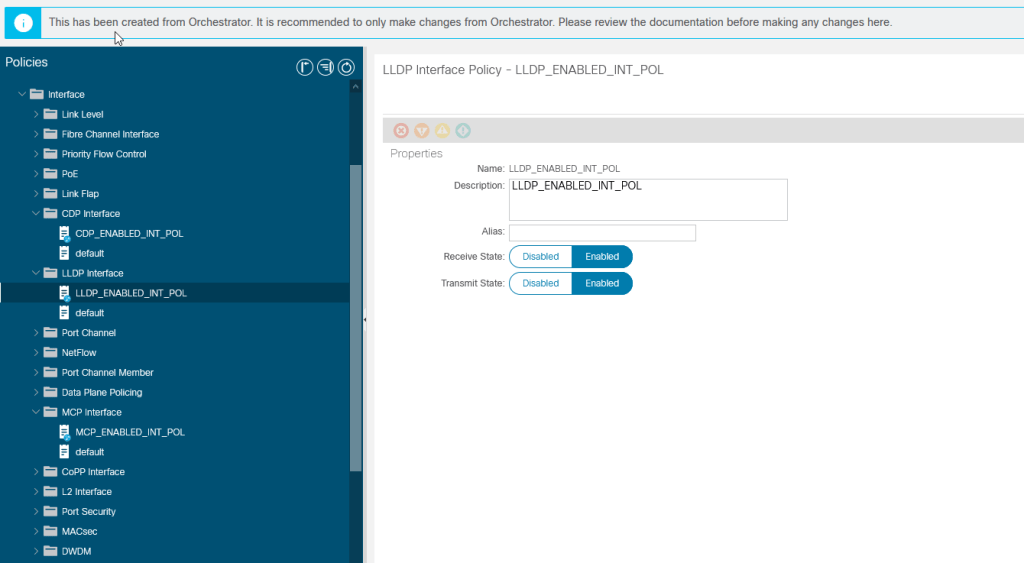
Now run terraform apply and log into ACI and take a look for yourself. We can see all three policies and the settings that we defined for them. Anyone familiar with Cisco’s MSO will notice This has been created from Orchestrator. It is recommended to only... While we did not use MSO to configure these settings, Terraform is nice enough to check the same box in the API so that we can see that is was not manually created.
Okay, these policies are not useful unless we can add them into a policy group and this is where the linking of resources comes into play. Each resource that is created has a Terraform unique name. This name as well as other properties can be referenced else where in your Terraform file.
resource "aci_leaf_access_port_policy_group" "LEAF_ACCESS_PORT_GRP_POL" {
  name = "LEAF_ACCESS_PORT_GRP_POL"
  description = "LEAF_ACCESS_PORT_GRP_POL"
  relation_infra_rs_lldp_if_pol = "uni/infra/lldpIfP-LLDP_ENABLED_INT_POL"
}
The aci_leaf_access_port_policy_group resource takes many arguments. Most of these are the DNs of the interface policies we just created. If we add this to our file and save. We will see an interface policy group with just our LLDP policy applied to it. Okay, but who has time to remember or lookup what each of these DNs are for each of the policies? I don’t so I use Terraform Resource Attributes. These are bits of information about specific resources that can be referenced in Terraform code.
resource "aci_leaf_access_port_policy_group" "LEAF_ACCESS_PORT_GRP_POL" {
  name = "LEAF_ACCESS_PORT_GRP_POL"
  description = "LEAF_ACCESS_PORT_GRP_POL"
  relation_infra_rs_lldp_if_pol = aci_lldp_interface_policy.LLDP_ENABLED_INT_POL.id
  relation_infra_rs_cdp_if_pol = aci_cdp_interface_policy.CDP_ENABLED_INT_POL.id
  relation_infra_rs_mcp_if_pol = aci_miscabling_protocol_interface_policy.MCP_ENABLED_INT_POL.id
}
The Cisco ACI provider stores the ACI DN of a resource as the ‘id’ of that resource. When we reference an attribute the format for that attribute is always resource.resource_name.attribute Resource name is the Terraform Name that we assigned and is NOT the name of the policy in ACI, though, in this case, we have made them the same
- aci_lldp_interface_policy.LLDP_ENABLED_INT_POL.id
- aci_cdp_interface_policy.CDP_ENABLED_INT_POL.id
- aci_miscabling_protocol_interface_policy.MCP_ENABLED_INT_POL.id
Save the file and run apply.
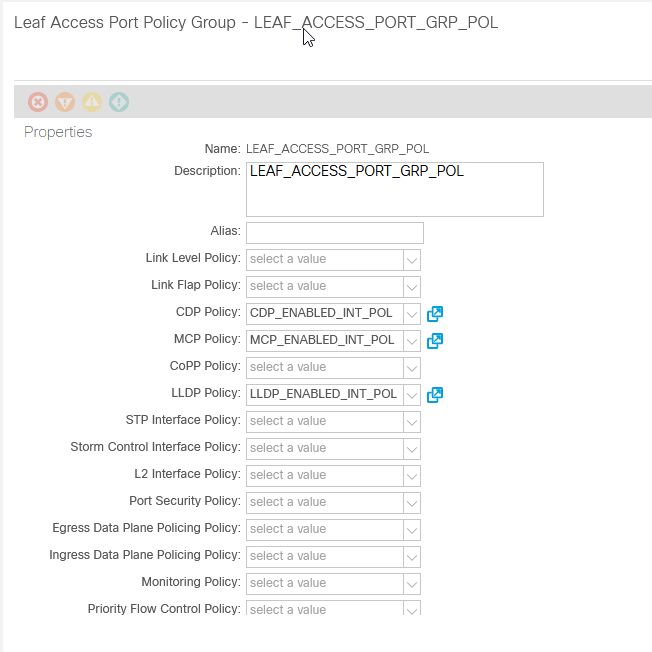
Nice right? Now let’s change something. Lets disable CDP. Comment out the CDP enabled policy and create a new disabled policy. Update the reference in the interface policy group. Save and apply!
#resource "aci_cdp_interface_policy" "CDP_ENABLED_INT_POL" {
#  name = "CDP_ENABLED_INT_POL"
#  description = "CDP_ENABLED_INT_POL"
#  admin_st = "enabled"
#}

resource "aci_cdp_interface_policy" "CDP_DISABLED_INT_POL" {
  name = "CDP_DISABLED_INT_POL"
  description = "CDP_DISABLED_INT_POL"
  admin_st = "disabled"
}

resource "aci_leaf_access_port_policy_group" "LEAF_ACCESS_PORT_GRP_POL" {
  name = "LEAF_ACCESS_PORT_GRP_POL"
  description = "LEAF_ACCESS_PORT_GRP_POL"
  relation_infra_rs_lldp_if_pol = aci_lldp_interface_policy.LLDP_ENABLED_INT_POL.id
  relation_infra_rs_cdp_if_pol = aci_cdp_interface_policy.CDP_DISABLED_INT_POL.id
  relation_infra_rs_mcp_if_pol = aci_miscabling_protocol_interface_policy.MCP_ENABLED_INT_POL.id
}
Notice that the CDP enabled policy gets deleted, our new policy gets added, and our policy group gets updated!
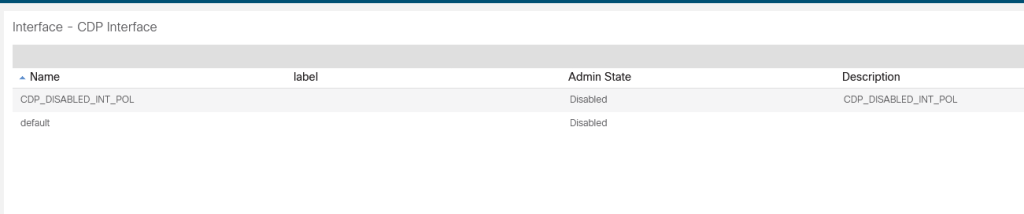
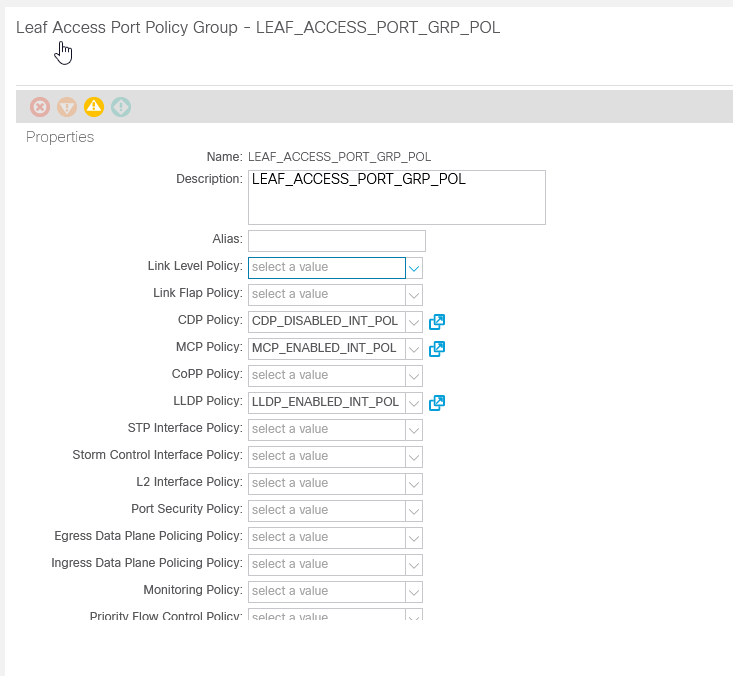
Now you can see how easy it can be to define your desired configuration and change it around or link resources together as needed.
 Work, and stuff